
The One-Off Is Now Routine. Every Order Watched. Every Special Step Taken.
Autopilot listens for the situations your team used to watch for by hand, and takes the steps for you. Build as many workflows as you need.
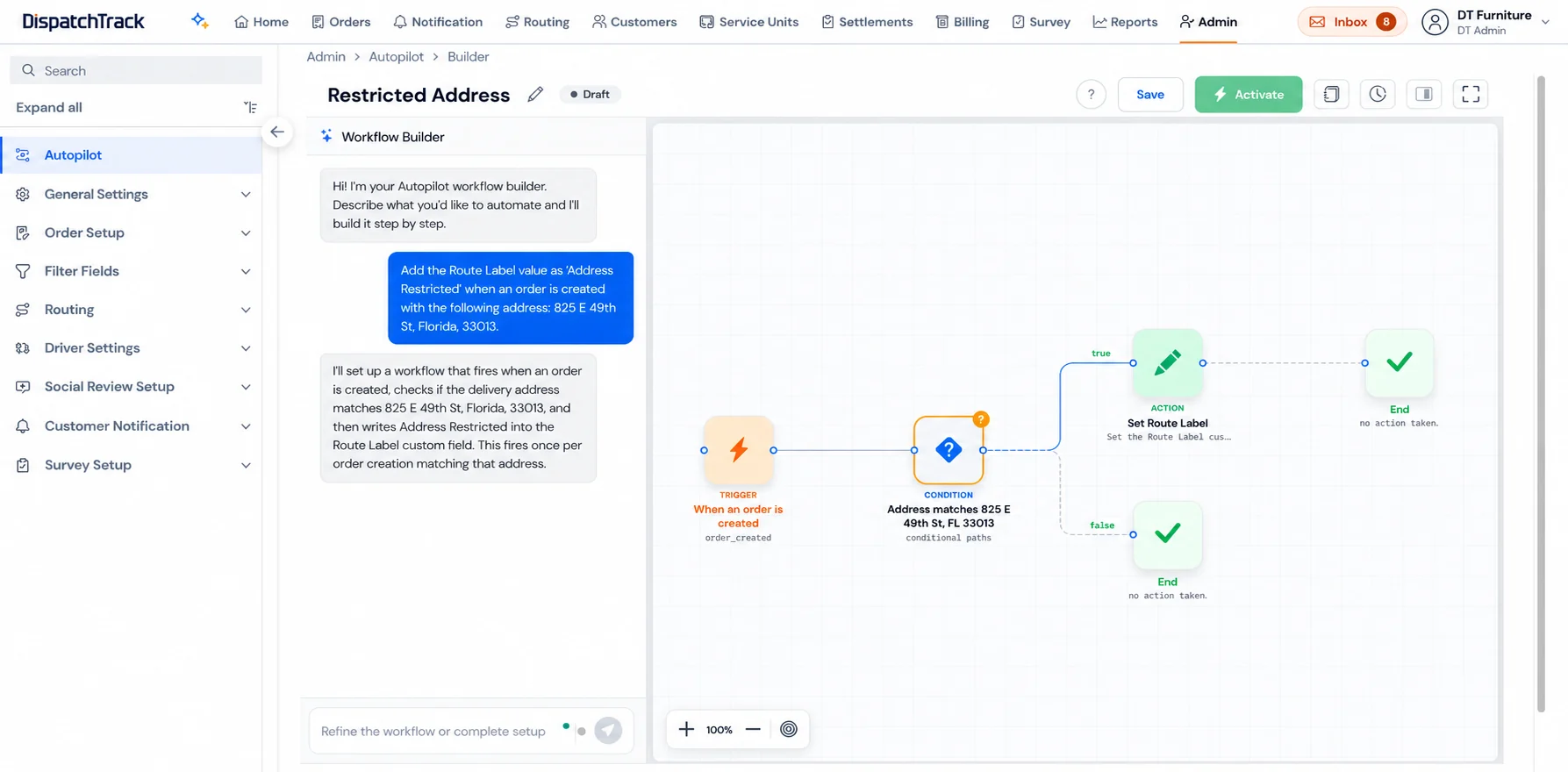
Describe It. AI Builds It.
From plain English to a visible workflow in moments.
- Chat to buildDescribe the steps the way you’d explain it to a new hire; Autopilot turns it into a workflow.
- Operationally-awareThe builder already knows your forms, order fields, and features, so it builds with your nomenclature and existing processes.
- Deploy with confidenceEvery workflow lays out on a live canvas as trigger, condition, and action, so you can check the logic first.
Your thorniest manual process. Automated in the background.
Each manual workflow costs someone’s time. At scale, that adds up to headcount.
- Prepare your ordersCheck the dollar value on every order before it goes out for dispatch.
- Paperwork? Sorted.Require a certificate of insurance when a delivery goes to a location that requires one.
- Stay on top of carrier changes.When a third-party carrier moves a window the customer already confirmed, the right people hear about it at the right time.
Any Trigger. Any Action.
Autopilot checks every order for your triggers and acts immediately when one comes up.
- Triggers on data or statusAn order has certain data, is missing it, or reaches a specific status.
- Acts anywhere in DispatchTrackEdit the order, add a note, notify someone. Anything your team would do by hand.
- Reaches your other systemsCall an API to take action in the other products you run.
Grow Your Orders—Not Your Payroll
Scale your business without time-consuming workarounds.
- Fewer manual stepsSay goodbye to busywork—the work now runs on its own.
- Fewer errorsThe same steps, done the same way, on every order.
- No custom codeChange a workflow in plain English—no support tickets or developer resources required.
Every delivery operation has steps that live only in someone’s head. They’re the first steps to break when you grow.
More from our researchBuilt for every kind of delivery
Catch every carrier change to a window your customer already confirmed.
See how3PL & final-mile carriersGive each client its own special handling without a coordinator for each account.
See howB2B distributionScrub order values before dispatching without checking them by hand.
See howBuilding suppliesGet the job-site paperwork on file before the truck leaves the yard.
See howWhat operations teams ask about Autopilot.
What is Autopilot?
A no-code, AI-powered workflow builder inside DispatchTrack. It listens to every order, watches for a trigger you define, and takes an action, such as scrubbing an order’s dollar value before dispatch or requiring a certificate of insurance for certain locations. You build each workflow by describing it in plain language.
Do I need a developer?
No. There’s no code and no rule syntax to learn, and no support ticket. You describe the workflow in plain language and check it on the canvas before you activate it.
What can trigger a workflow, and what can it do?
A workflow fires when an order has certain data, is missing it, or reaches a specific status. It can then do nearly anything in DispatchTrack, from editing the order or adding a note to notifying someone, and it can call APIs to act in other products.
Where does the return on investment come from?
From the people hours it gives back. Checks and follow-ups your team does by hand on every order run automatically, so the same team can handle more orders as you grow.
Does AI make decisions while a workflow runs?
No. AI builds the workflow from your description. Once it’s active, it follows the trigger, condition, and action you approved, the same way on every order.
How do we keep it safe?
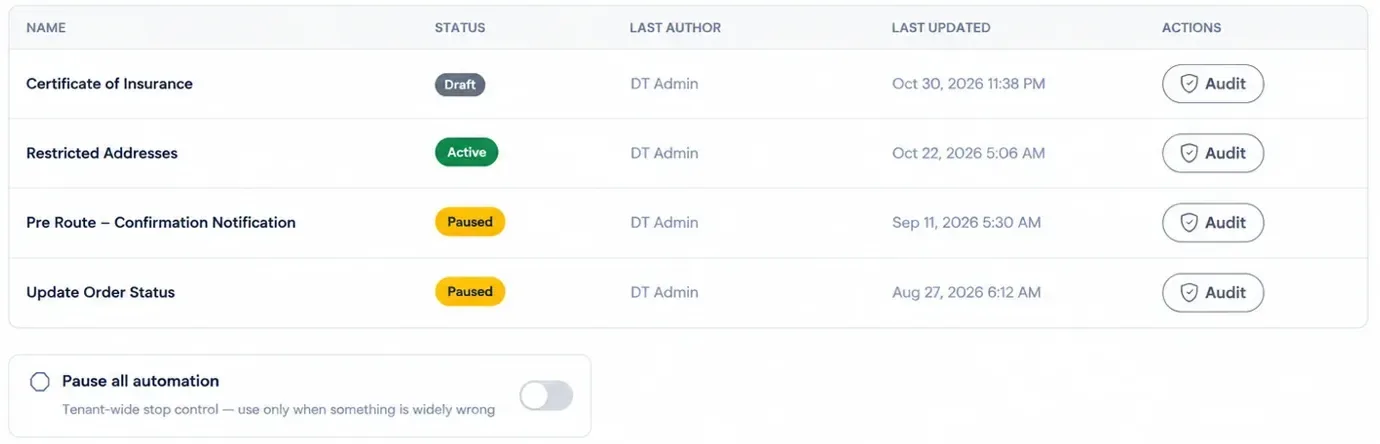
Workflows stay drafts until activated, only administrative users can build them, and a single control pauses all automation instantly.
Who can use Autopilot?
DispatchTrack customers on qualifying plans.
How do I scale delivery operations without adding dispatchers?
Automate the checks and follow-ups your team does by hand on every order. Autopilot watches each order for the situations you define and takes the next step, so the same team can handle more orders as you grow.
How do I automate repetitive dispatch tasks?
Describe the task in plain language and Autopilot builds the workflow. Common examples: scrubbing order values before dispatch, requiring a certificate of insurance for listed locations, alerting customer service when a carrier moves a confirmed window, and sending special-account summaries to the sales rep. Workflows stay drafts until an admin turns them on, and one control pauses them all.
What is no-code workflow automation for delivery operations?
Software that lets operations teams automate their own delivery workflows without developers or rule syntax. In DispatchTrack Autopilot, you describe the workflow in plain English, check it on a visual canvas, and turn it on.
What workflows can DispatchTrack Autopilot automate?
When an order is ready to dispatch, scrub its value. When an order is scheduled for a listed location, require a certificate of insurance. When a carrier moves a confirmed window, alert customer service. When a special account’s order is delivered, send the summary to its rep.
Who on Your Team Is Doing the Software’s Job?
Bring the one manual workaround your team can’t run without. We’ll build the workflow with you in the demo.