
Ready Before the Truck Rolls. Done Right Before the Team Leaves.
Customers confirm the delivery site is ready before you schedule, customized forms walk your teams through every required step on site, and driver release codes give you a chance to save the sale.
Will this delivery go up or down more than two flights of stairs?
Does your building require a certificate of insurance?
Any tight turns or obstacles that need more than a two-person team?
Add photos of the entry and path
Verification Steps That Protect Every Delivery
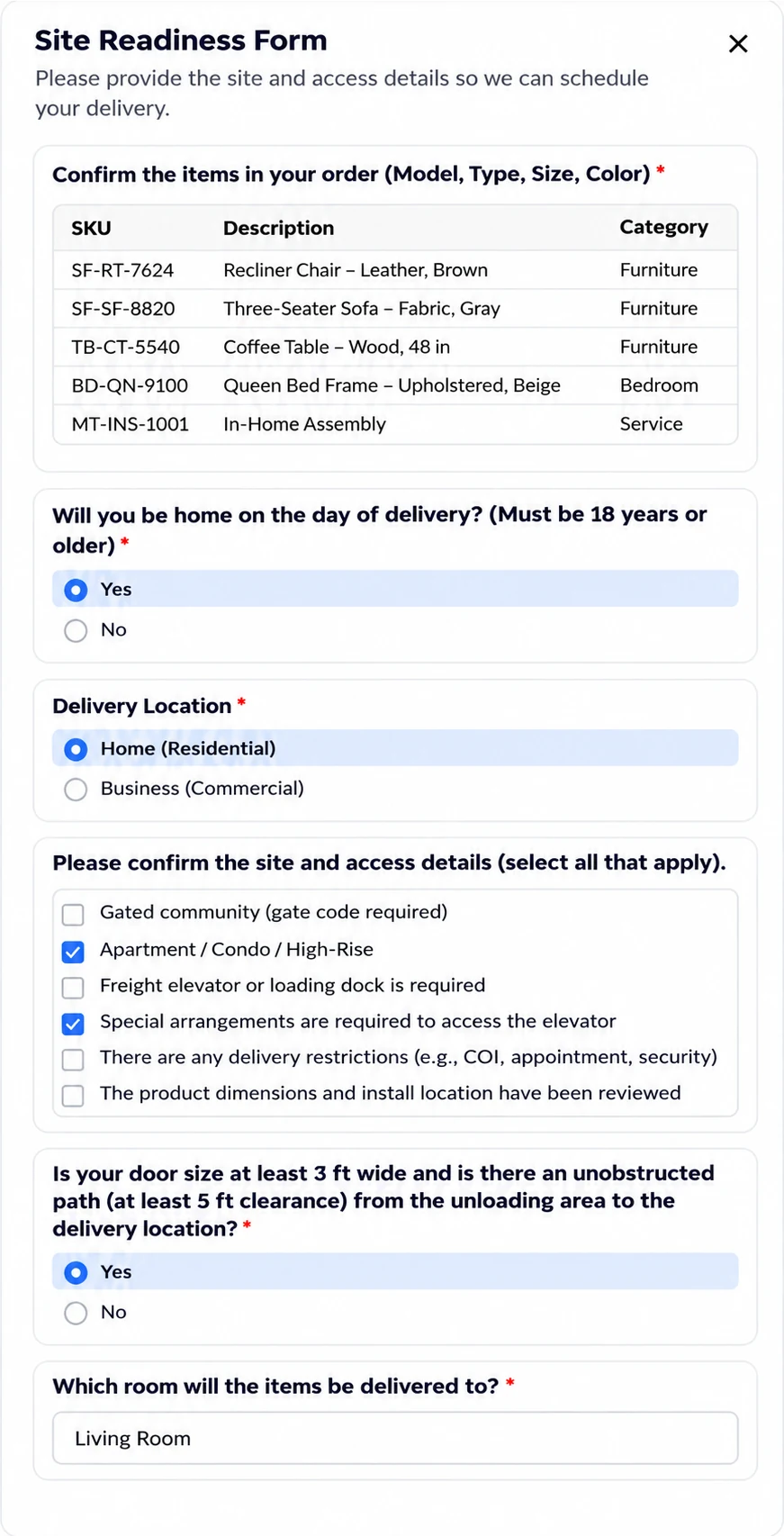
Site readiness confirms, before the job is scheduled, that the delivery site can receive the order: access, stairs, elevators, space, a certificate of insurance, and anything else your team needs to know. DispatchTrack sends customers a customized form by link. Their answers update the order in real time, and blockers are flagged before scheduling, so failures stop at the source.
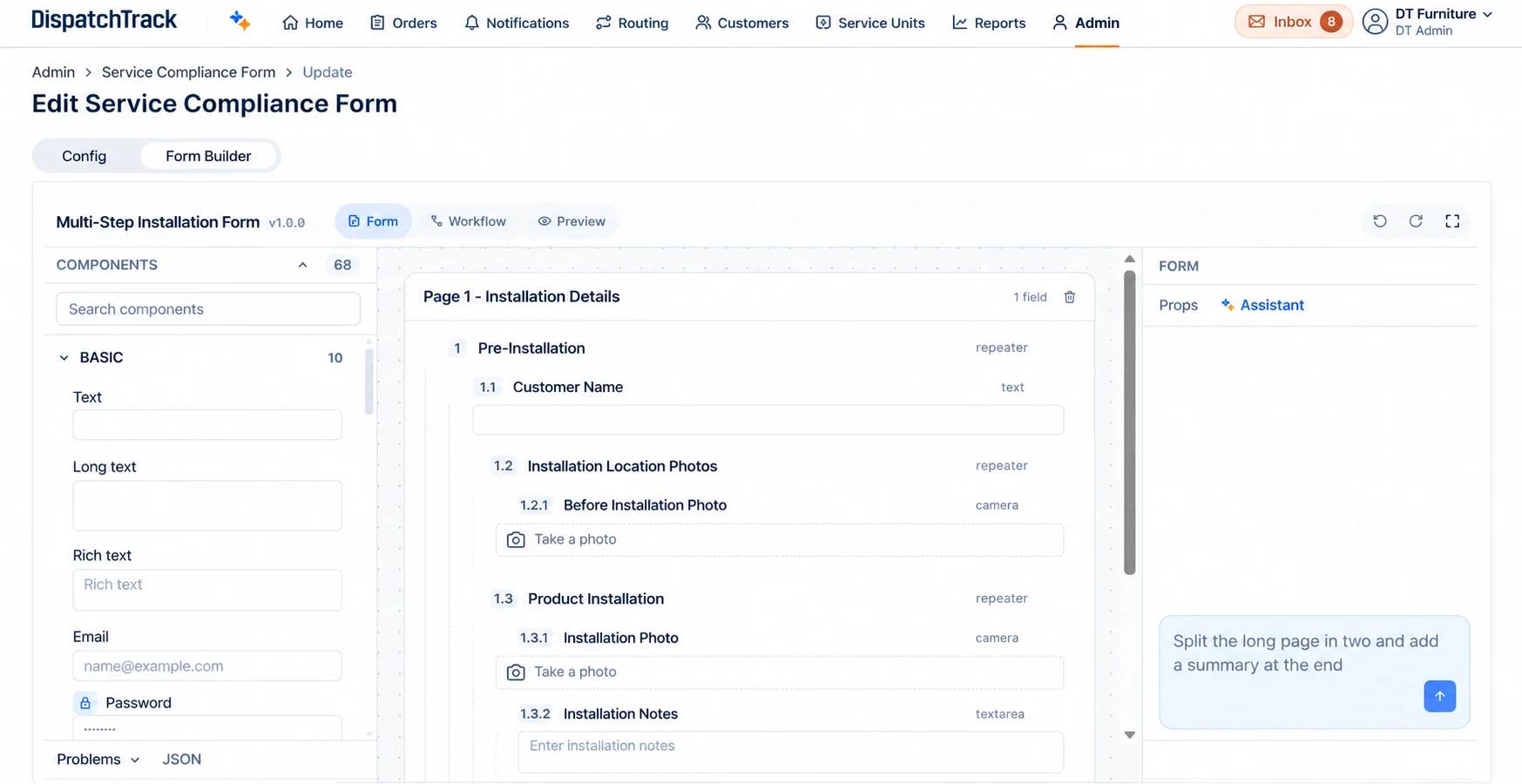
Service compliance makes sure the job is done exactly as promised once the team arrives. Dynamic Forms are step-by-step workflows in the driver app, with checklists, required photos, signatures, and placement confirmations, configurable by product type, customer, order type, or SKU. Teams complete each required step before they move on.
Rework Starts Before the Truck Leaves
Manually confirming that every site is ready doesn’t scale, and the alternative is reschedules and failed deliveries. Even products that arrive on time can end up in the wrong place, installed incorrectly, or missing a signature, which means callbacks, rework, and customer disputes.
Site Readiness, Self-Served
Readiness validation shifts to the customer.
- Custom forms by linkCustomized site readiness forms go to customers automatically.
- Updates in real timeAnswers sync to the order and update the workflow as soon as the form is complete.
- Blockers flagged before schedulingA missing certificate of insurance or a too-narrow stairwell stops a failed delivery before it’s scheduled.
- One form for every vendorVendors can be required to use the same forms, and multi-instance sync keeps clients and vendors aligned from a single customer submission.
Dynamic Forms for Every Job
Digital job-site guides built into the driver app.
- Step by stepTeams follow checklists, take required photos, capture signatures, and confirm placement in one workflow.
- Configured to the jobSet the steps by product type, customer, order type, or SKU.
- Required before moving onRequired steps must be completed before the job can be closed.
- A record for every jobPhotos, signatures, and checklists leave zero ambiguity about what was done.
Save the Sale While the Driver Is On Site
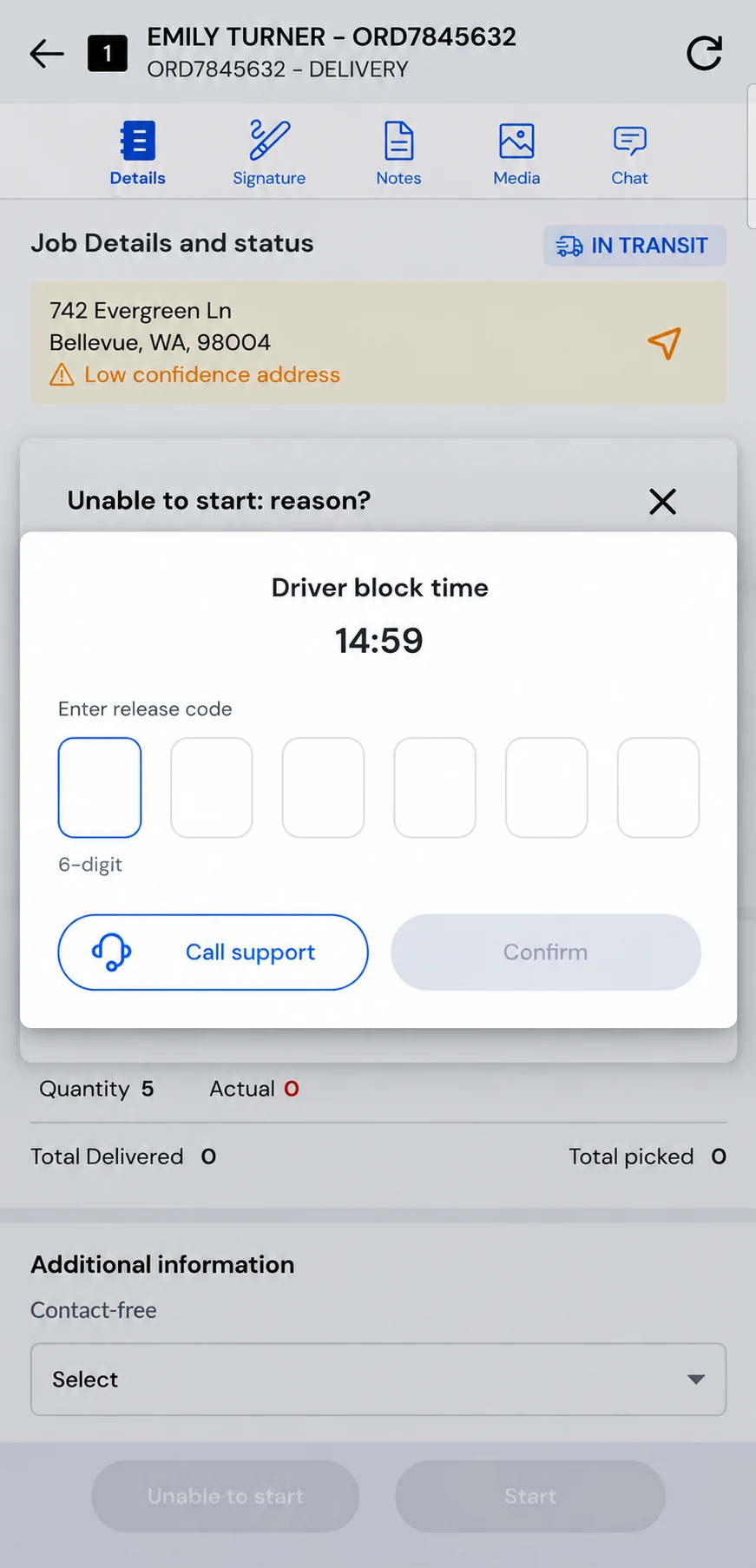
Exceptions resolved before the truck leaves.
- Release CodesWhen a driver can’t start or fully complete a job, the app won’t let them move on until they get a code from customer support.
- A chance to recover revenueOffer an on-the-spot discount for a cosmetic issue, resolve minor damage without a return, reschedule an access issue, or recover a customer-not-home stop in real time.
- Customer verification codesFor deliveries that need it, the driver enters a one-time code the customer received before finishing the job.
One Workflow From Booking to Sign-Off
Readiness answers land on the order, where Route Optimization plans around them and Driver AI reads them to the driver before the stop. Vision AI checks customer site photos and delivery photos. And the record Dynamic Forms capture is the same record Claims Management uses if anything is disputed.
ABC Warehouse uses required photos, checklists, and customer confirmations to hold third-party delivery teams to its standards before they move to the next stop.
“Before DispatchTrack, we had no real control over how our brand was represented at the final step to the customer. Now, with DispatchTrack’s routing and mobile solutions, we can see exactly what’s happening in real time, ensure compliance with our standards, and intervene immediately if needed.”
Go deeper
What delivery and install teams ask about compliance.
How can I confirm a customer’s home is ready before a big-and-bulky delivery?
Ask the customer, before you schedule. DispatchTrack sends a customized site readiness form by link, covering access, stairs, elevators, space, and building requirements like a certificate of insurance. Customers can also send photos of doorways and rooms for Vision AI to check fit. Blockers are flagged before the job is scheduled.
How do I ensure site readiness before the driver shows up?
Shift readiness checks to the customer. Self-serve site readiness forms update the order in real time when they’re completed, blockers are flagged before scheduling, and Driver AI reads the details to the driver before the stop.
What are DispatchTrack Dynamic Forms?
Step-by-step job-site guides built into the DispatchTrack driver app. Dynamic Forms walk delivery and installation teams through checklists, required photos, signatures, and placement confirmations, configured by product type, customer, order type, or SKU.
How do I enforce compliance checklists for drivers?
Build them into the driver app as required steps. With Dynamic Forms, each job type has its own checklist, required photos, and sign-offs, and the job can’t be closed until the required steps are complete. Without workflows like these, one in four deliveries require rework; with them, rework drops below 10%.
How do DispatchTrack Dynamic Forms enforce on-site verification steps?
By making the steps required. Teams can’t finish the job until each mandatory checklist item, photo, and signature is captured, and everything is stored with the order as a record for your team, your client, and any claim.
How do I verify an installation was completed correctly?
Require proof at each step. A Dynamic Form for the install can require photos of the finished placement, a checklist of completed tasks, and the customer’s signature, so you have a complete record before the team leaves.
How can drivers save a sale when something goes wrong on site?
With Release Codes, a driver who can’t start or complete a job can’t move on until customer support provides a code. That gives your team a chance to offer a discount for a cosmetic issue, resolve minor damage without a return, or reschedule an access issue while the driver is still on site.
Can customers confirm a delivery with a one-time code?
Yes, when you need it. The customer receives a one-time code before the stop, and the driver enters it before finishing the job, with customer support as a fallback.
Deliver Exactly as Promised.
See site readiness forms and Dynamic Forms set up for jobs like yours.