
Customers Pick the Window. Our Routing Handles the Rest.
Customers book and reschedule deliveries from a link or a chat with DT Agent, with dynamic windows based on your capacity, zones, and delivery schedules.
Scheduling Based on Your Real Capacity
Self-scheduling lets customers choose their own delivery or service window from options DispatchTrack generates from your operation: open hours, capacity by fleet and zone, your delivery calendar, and the service time each order needs. Customers book from a link in a text or email, on your website, or by chatting with DT Agent, and every option they see is one your teams can actually run.
When plans change, customers reschedule the same way. There’s no hold queue and no dispatcher in the loop: the new window is confirmed, routing and downstream systems update automatically, and the customer’s notifications follow the change.
You Set the Rules. Customers Only See Windows That Fit.
Scheduling by phone means hold times, back-and-forth calls, and schedulers juggling capacity in their heads. A window that looks open may not be one your routes can keep. Self-scheduling builds every option from four rules you set once and adjust as your operation changes.
Dates and times. A baseline of windows from your open business hours.
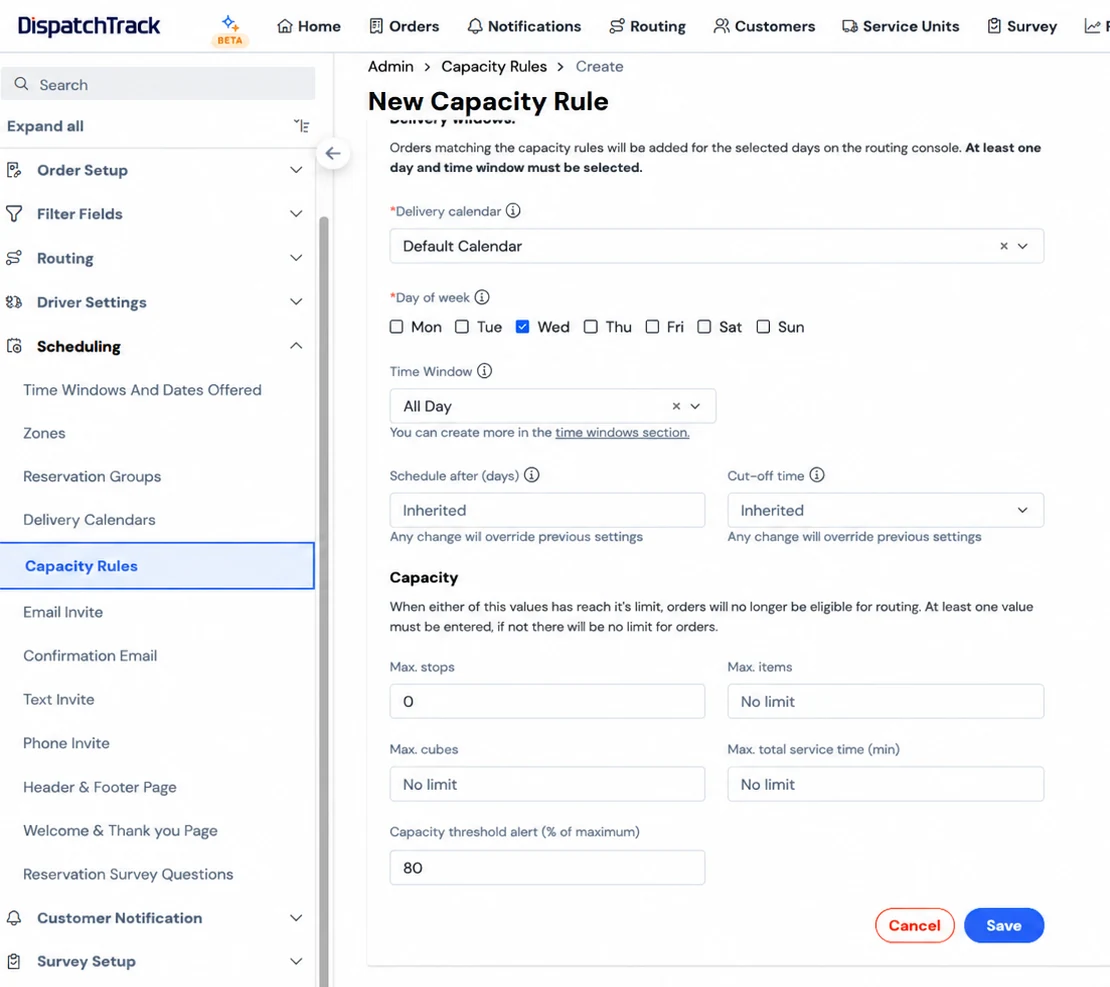
Capacity. Maximums in the unit your fleet uses: cubes, weight, items, or stops.
Regional zones. Availability by the zones you serve and the fleet assigned to each.
Delivery calendar. Working days, seasonality, and holidays.
The rules that decide which windows a customer sees.
Booking and Rebooking, Self-Served
From a link, your website, or a conversation with DT Agent.
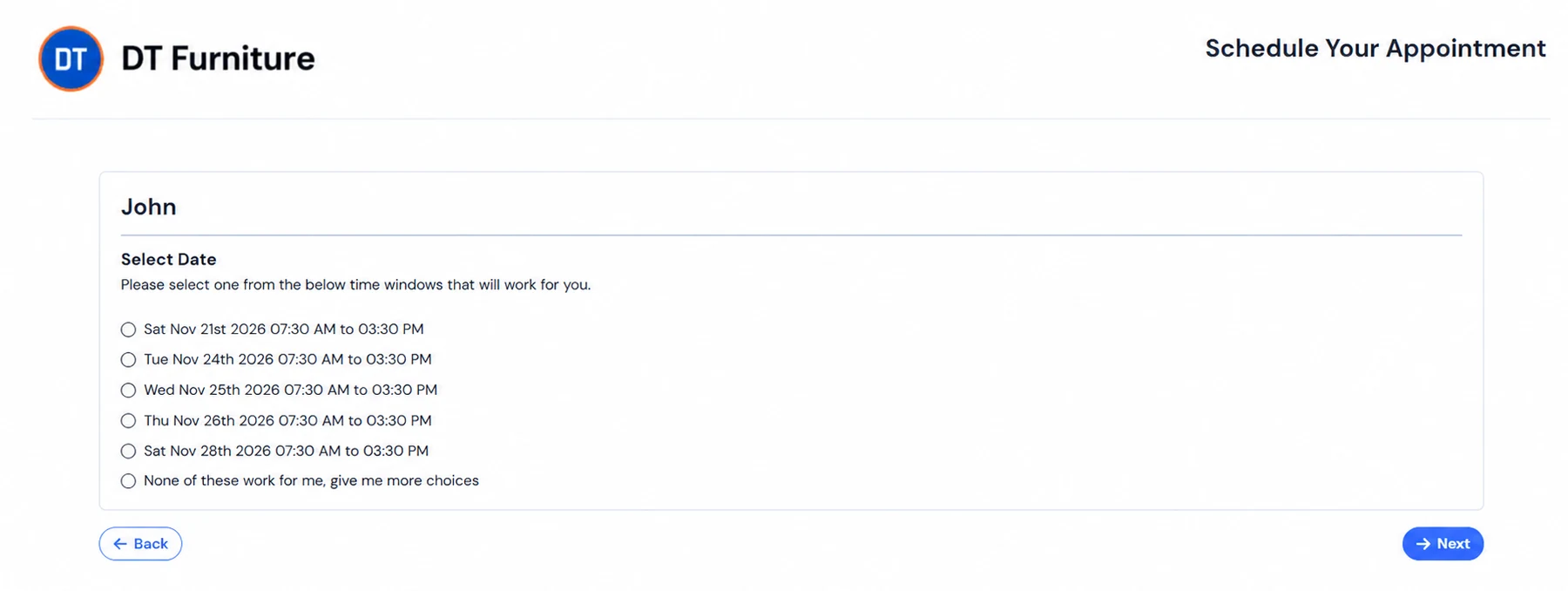
- Book from a linkCustomers get a scheduling link by text or email and pick from the windows that are open for their order.
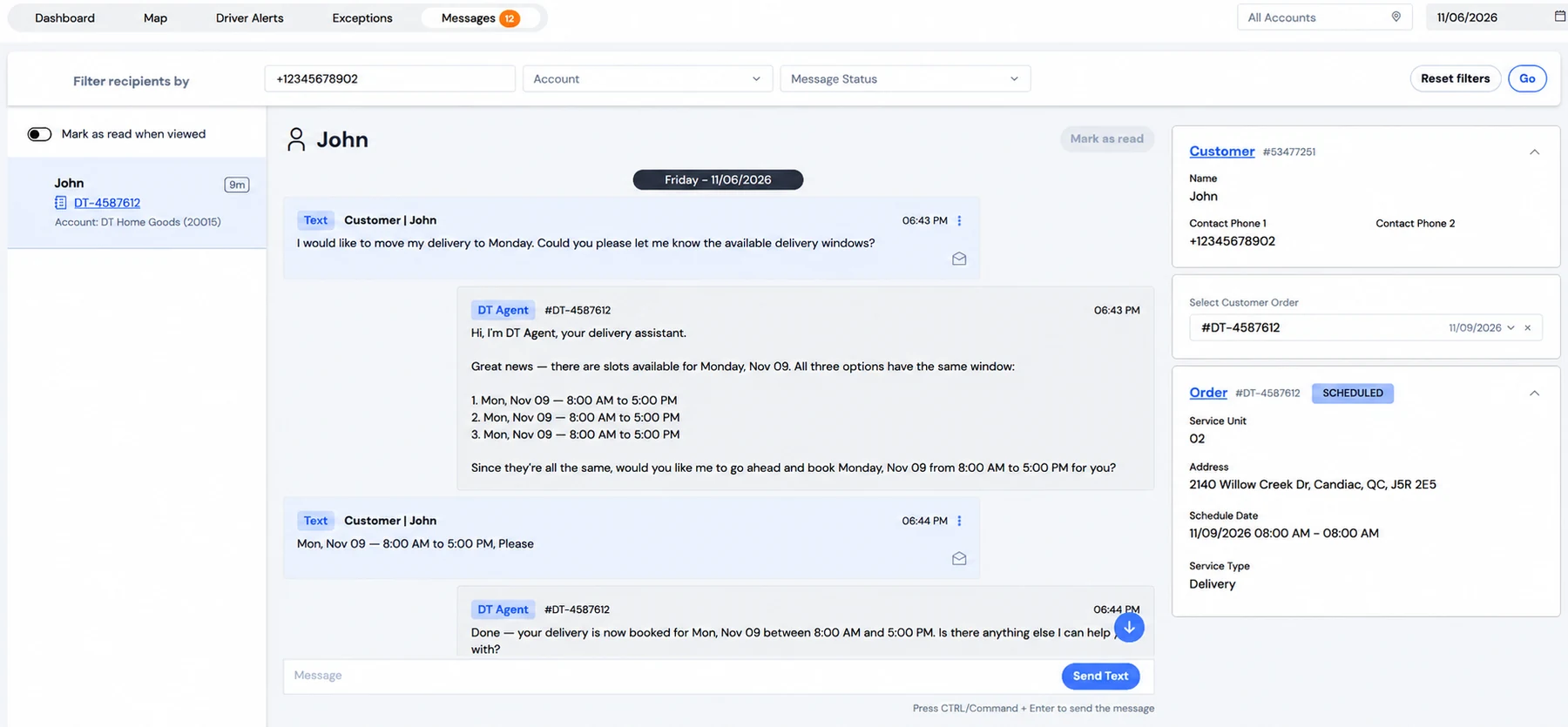
- Chat with DT AgentCustomers ask to schedule or move a delivery in plain language. DT Agent offers windows that fit your routing and scheduling rules, then confirms the change.
- Reschedule without a callNo hold queue and no dispatcher involvement. Confirmations and downstream systems update automatically.
Windows Your Operation Can Keep
Capacity is checked before a window is ever offered.
- Real-time capacityWindows reflect what’s already booked by fleet, zone, and day, so a full day stops showing as an option.
- Built around the jobOptions account for driver availability, vehicle type, available capacity, and the service time the order needs.
- Changes with your operationImport and update zones and capacity rules as your fleet, seasons, and holidays change.
From Booking to Route, One Record
The window a customer books goes straight to Dispatching & Scheduling and Route Optimization, which plan the day around it. Customer Experience sends the confirmation and reminders, and if anything changes, the customer moves the delivery the same way they booked it.
Ferguson offers live customer self-scheduling based on capacity across 1,100 sales locations. Simple Home Plus lets customers self-schedule through its STORIS integration, with booked times flowing into DispatchTrack for routing and text updates.
“When you work with a partner like DispatchTrack that can truly make our associates’ lives easier at the local level while also pleasing the customer, that’s a win-win situation.”
Go deeper
What delivery teams ask about self-scheduling.
What is customer self-scheduling for deliveries?
It lets customers choose their own delivery or service window instead of calling to set one. In DispatchTrack, the windows they see are generated from your operation, including open hours, capacity by fleet and zone, your delivery calendar, and each order’s service time, so every option is one your teams can run.
How can retailers let customers self-schedule large-item delivery?
Send a scheduling link by text or email, add scheduling to your website, or let customers book by chatting with DT Agent. DispatchTrack offers only windows your capacity can support, accounting for the vehicle, the team, and the service time a big and bulky delivery or install needs. The booked window flows straight into routing.
How do I let customers reschedule deliveries themselves?
Give them the same link, or let them reply to a notification and chat with DT Agent. Customers pick a new window from the options that fit your routing rules, DT Agent confirms the change, and downstream systems update automatically, with no hold queue and no dispatcher involved.
Can DT Agent schedule and reschedule deliveries without a person?
Yes, for routine requests. DT Agent offers windows that fit your rules, confirms the change, and updates the order. DispatchTrack reports that 90% of customer replies DT Agent handles are resolved entirely by AI, and anything it can’t resolve goes to your team with the full conversation attached.
How does DispatchTrack decide which delivery windows to offer?
From rules you set once: time windows based on your business hours, capacity limits in cubes, weight, items, or stops, the regional zones you serve and the fleet assigned to each, and a delivery calendar with working days, seasonality, and holidays. Windows that are already full stop appearing.
Does self-scheduling work with my ERP or point-of-sale system?
Yes. Orders can flow in from your ERP or POS, and booked windows flow back. Simple Home Plus uses a STORIS integration so customers self-schedule delivery times that flow into DispatchTrack for routing and text tracking updates.
Can contractors self-schedule building supply deliveries?
Yes. Contractors book deliveries and installs against their job site schedules, in windows checked against your capacity. Ferguson rolled out live customer self-scheduling across 1,100 sales locations in three months.
Let Customers Book the Windows You Can Hit.
See self-scheduling and DT Agent rescheduling on windows built from your own capacity.